TimeToPick
Builder

Components

CPUsBrowseGPUsBrowseMotherboardsBrowseRAMBrowseCasesBrowsePSUsBrowseCPU CoolersBrowseCase FansBrowseStorageBrowseSound CardsBrowse

Peripherals

MonitorsBrowseKeyboardsBrowseMiceBrowseHeadphonesBrowseSpeakersBrowseWebcamsBrowseWiFi CardsBrowse

Smart Wizard

Get a complete build plan based on budget and goals.

Build Comparison

Compare complete builds side by side.

Part Comparison

Check specs, price, and value across parts.

Bottleneck Calculator

Measure CPU and GPU balance before you buy.

Power Calculator

Estimate wattage and PSU headroom.

Will It Run?

Test your hardware against popular games.

Guides

Completed Builds

Browse finished community setups.

Forums

Ask questions and join build discussions.

Login
TimeToPick
BuilderGuides

Components

CPUsGPUsMotherboardsRAMCasesPSUsCPU CoolersCase FansStorageSound Cards

Peripherals

MonitorsKeyboardsMiceHeadphonesSpeakersWebcamsWiFi Cards

Smart Wizard

Get a complete build plan based on budget and goals.

Build Comparison

Compare complete builds side by side.

Part Comparison

Check specs, price, and value across parts.

Bottleneck Calculator

Measure CPU and GPU balance before you buy.

Power Calculator

Estimate wattage and PSU headroom.

Will It Run?

Test your hardware against popular games.

Completed Builds

Browse finished community setups.

Forums

Ask questions and join build discussions.

Login
Theme
TimeToPick

Build Smarter, Pick Better

TimeToPick helps you research parts, compare builds, compare offers, and make faster decisions across every stage of your next PC upgrade.

As an Amazon Associate I earn from qualifying purchases.

Build Tools

BuilderSmart WizardBuild ComparePart CompareBottleneck CalculatorPower CalculatorWill It Run?

Browse

CPUsGPUsMotherboardsRAMCasesPSUsStorageMonitors

Community

Completed BuildsForumsBuild Guides

Account

My BuildsSettings

Β© 2026 TimeToPick. All rights reserved.

AboutContactAffiliate DisclosurePrivacy PolicyTerms of Service
TimeToPick
Builder

Components

CPUsBrowseGPUsBrowseMotherboardsBrowseRAMBrowseCasesBrowsePSUsBrowseCPU CoolersBrowseCase FansBrowseStorageBrowseSound CardsBrowse

Peripherals

MonitorsBrowseKeyboardsBrowseMiceBrowseHeadphonesBrowseSpeakersBrowseWebcamsBrowseWiFi CardsBrowse

Smart Wizard

Get a complete build plan based on budget and goals.

Build Comparison

Compare complete builds side by side.

Part Comparison

Check specs, price, and value across parts.

Bottleneck Calculator

Measure CPU and GPU balance before you buy.

Power Calculator

Estimate wattage and PSU headroom.

Will It Run?

Test your hardware against popular games.

Guides

Completed Builds

Browse finished community setups.

Forums

Ask questions and join build discussions.

Login
TimeToPick
BuilderGuides

Components

CPUsGPUsMotherboardsRAMCasesPSUsCPU CoolersCase FansStorageSound Cards

Peripherals

MonitorsKeyboardsMiceHeadphonesSpeakersWebcamsWiFi Cards

Smart Wizard

Get a complete build plan based on budget and goals.

Build Comparison

Compare complete builds side by side.

Part Comparison

Check specs, price, and value across parts.

Bottleneck Calculator

Measure CPU and GPU balance before you buy.

Power Calculator

Estimate wattage and PSU headroom.

Will It Run?

Test your hardware against popular games.

Completed Builds

Browse finished community setups.

Forums

Ask questions and join build discussions.

Login
Theme
TimeToPick

Build Smarter, Pick Better

TimeToPick helps you research parts, compare builds, compare offers, and make faster decisions across every stage of your next PC upgrade.

As an Amazon Associate I earn from qualifying purchases.

Build Tools

BuilderSmart WizardBuild ComparePart CompareBottleneck CalculatorPower CalculatorWill It Run?

Browse

CPUsGPUsMotherboardsRAMCasesPSUsStorageMonitors

Community

Completed BuildsForumsBuild Guides

Account

My BuildsSettings

Β© 2026 TimeToPick. All rights reserved.

AboutContactAffiliate DisclosurePrivacy PolicyTerms of Service
TimeToPick
Builder

Components

CPUsBrowseGPUsBrowseMotherboardsBrowseRAMBrowseCasesBrowsePSUsBrowseCPU CoolersBrowseCase FansBrowseStorageBrowseSound CardsBrowse

Peripherals

MonitorsBrowseKeyboardsBrowseMiceBrowseHeadphonesBrowseSpeakersBrowseWebcamsBrowseWiFi CardsBrowse

Smart Wizard

Get a complete build plan based on budget and goals.

Build Comparison

Compare complete builds side by side.

Part Comparison

Check specs, price, and value across parts.

Bottleneck Calculator

Measure CPU and GPU balance before you buy.

Power Calculator

Estimate wattage and PSU headroom.

Will It Run?

Test your hardware against popular games.

Guides

Completed Builds

Browse finished community setups.

Forums

Ask questions and join build discussions.

Login
TimeToPick
BuilderGuides

Components

CPUsGPUsMotherboardsRAMCasesPSUsCPU CoolersCase FansStorageSound Cards

Peripherals

MonitorsKeyboardsMiceHeadphonesSpeakersWebcamsWiFi Cards

Smart Wizard

Get a complete build plan based on budget and goals.

Build Comparison

Compare complete builds side by side.

Part Comparison

Check specs, price, and value across parts.

Bottleneck Calculator

Measure CPU and GPU balance before you buy.

Power Calculator

Estimate wattage and PSU headroom.

Will It Run?

Test your hardware against popular games.

Completed Builds

Browse finished community setups.

Forums

Ask questions and join build discussions.

Login
Theme
  1. Home>
  2. Keyboards>
  3. Keyboard Nighthawk X8

Max

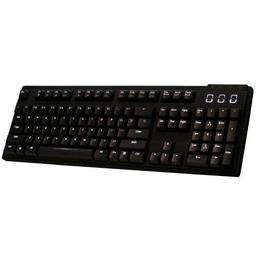
Max Keyboard Nighthawk X8

Mechanical BrownFullWiredWhite
gamingproductivity

Pricing is still being verified
Compare
Max Keyboard Nighthawk X8

Full Specifications

Full Specifications

Detailed architecture, platform, memory, and feature data.

Switches
Switch TypeMechanical Brown
Switch BrandCherry MX
Hot-SwappableNo
Layout
SizeFull
StyleStandard
TenkeylessNo
Features
ConnectionWired
WirelessNo
BacklightWhite
Polling Rate1000 Hz
Other
Mouse IncludedNo
ColorBlack

About This Product

The Max Nighthawk X8 is a wired mechanical keyboard featuring Cherry MX Brown switches and white backlighting. It offers a tactile typing experience suitable for both general use and gaming. This keyboard provides a reliable and consistent performance compared to membrane or lower-tier mechanical options.

Best for: General use, typing

Pros

  • Cherry MX Brown switches for tactile feedback
  • Durable wired connection
  • White backlighting for visibility
  • Standard layout for familiarity

Cons

  • No RGB lighting options
  • Wired connection lacks portability
  • Limited extra features

Verdict

β€œA solid, no-frills mechanical keyboard for users prioritizing reliable tactile feedback.”

Full Specifications

Switches
Switch TypeMechanical Brown
Switch BrandCherry MX
Hot-SwappableNo
Layout
SizeFull
StyleStandard
TenkeylessNo
Features
ConnectionWired
WirelessNo
BacklightWhite
Polling Rate1000 Hz
Other
Mouse IncludedNo
ColorBlack

User Reviews

Be the first to share your experience

Login to Review

Rating

0.0/5

No reviews yet

Login to Review